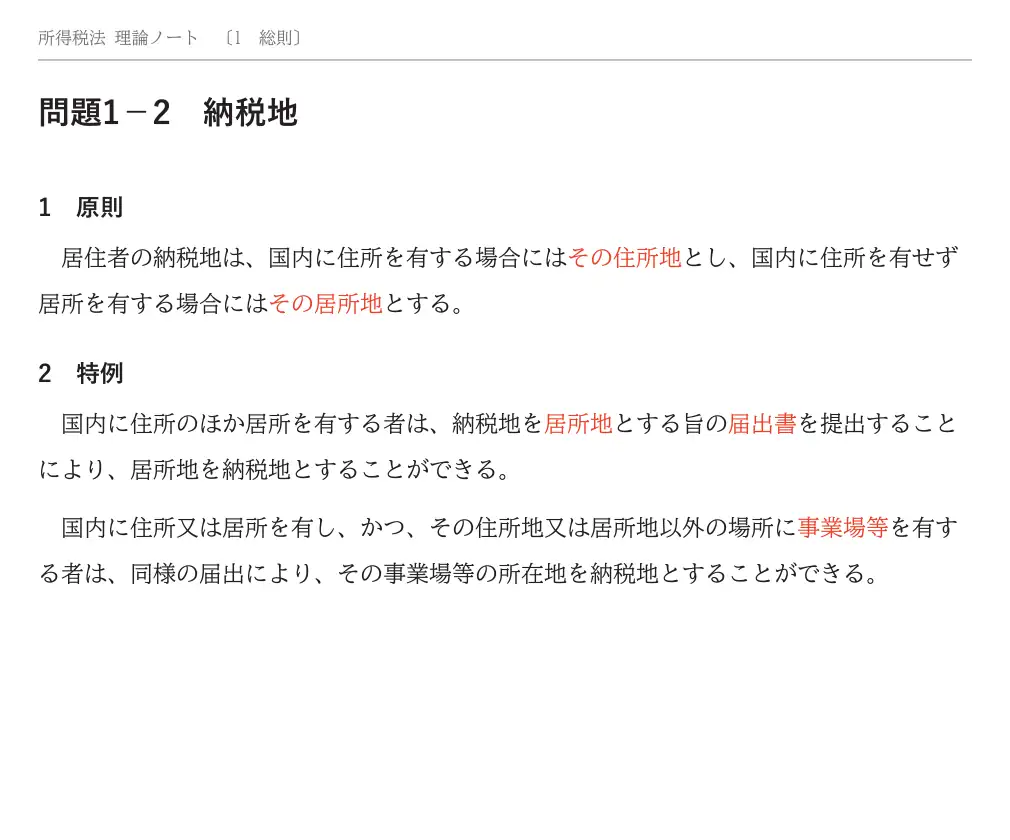
問題1−1元のページのまま、隠す。
PDF の中の赤い文字を見つけて、赤シートで隠します。文字を組み直さないので、図も分数も字下げも、元のページの見た目のままです。スキャンした PDF でも、文字が赤ければ隠れます。
- 赤シートは上下にずらして使えます。濃さは 3 段階
- 隠れた語句は、押すとその語句だけめくれます
- 1 行ずつ隠しながら読める「あて定規」
- 余白を削って大きく表示。ページ送りはスライド・フェード・なしから選べます
 理論めくり
English
お手持ちの理論テキストの PDF を取り込むと、赤い文字をそのまま赤シートで隠せます。紙のテキストと赤シートで覚えてきたやり方を、iPhone・iPad と Android で続けられます。
iPhone・iPad Android

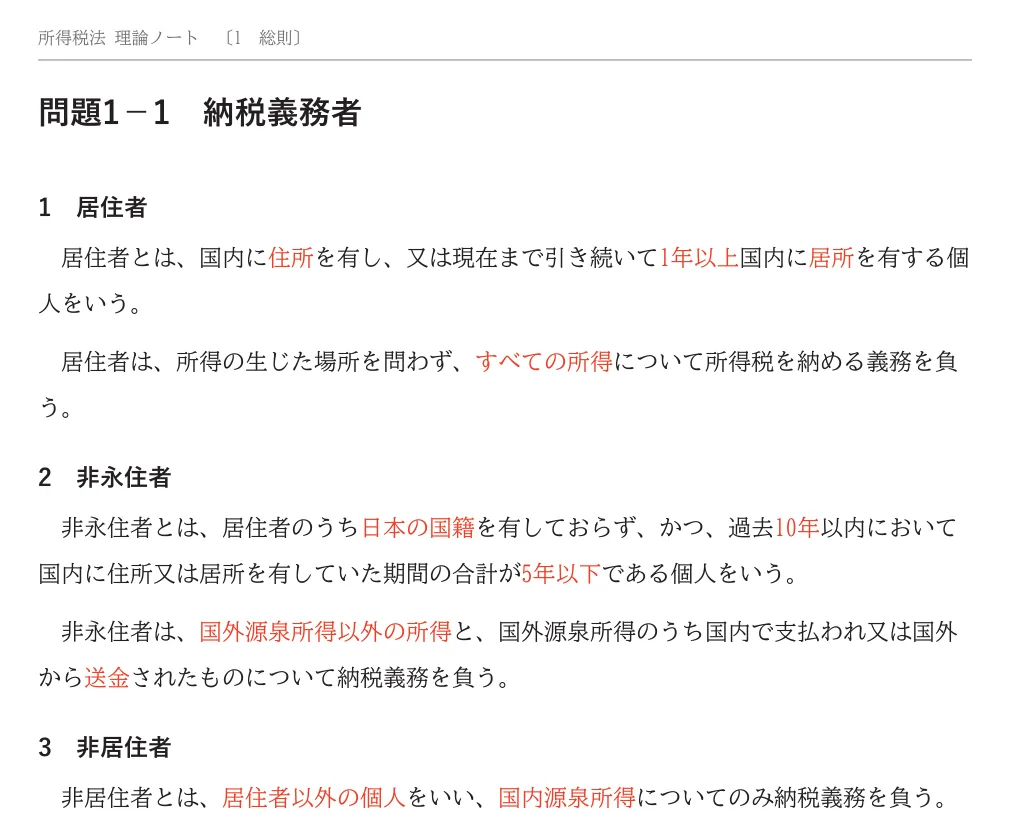
このページの赤い語も、右下の「赤シートを掛ける」で隠せます。説明を読みながら、暗記の手ざわりを試してください。
PDF の中の赤い文字を見つけて、赤シートで隠します。文字を組み直さないので、図も分数も字下げも、元のページの見た目のままです。スキャンした PDF でも、文字が赤ければ隠れます。
マーカーは 5 色と、暗記マーカー。太さは 3 段階で、引いた線は水平にそろいます。Apple Pencil で書き込めます(Android はスタイラスペンや指で)。暗記マーカーで引いた所は、緑シートを重ねると隠れます。
読み終わったら、覚え具合を 0〜100% で記録します。「今日まわす理論」は、覚え具合が低い順・読んでいない日が長い順に並びます。
取り込んだ PDF・書き込み・記録は、端末の中だけに置き、外へは送りません。アカウントの登録はありません。広告もありません。
教材はアプリに入っていません。ご自身でお持ちの PDF を取り込んでお使いください。
| 項目 | 無料 | Pro |
|---|---|---|
| 値段 | 0 円 | 月額 480 円 年額 4,800 円 |
| 取り込める本 | 1 冊 | 上限なし |
| 赤シート・あて定規・タイマー・覚え具合 | 使える | 使える |
| マーカーとペンの書き込み | その本の中で合わせて 10 ページまで | すべてのページ |
| 重要度 A・B・C で絞り込み | — | 使える |
Pro は自動更新の定額課金です。解約は iPhone・iPad では「設定」> 自分の名前 >「サブスクリプション」から、Android では Google Play の「定期購入」から。書き込んだページは、無料に戻っても読めて直せます。
「本棚」の「取り込む」を押し、PDF を選んでください(iPhone・iPad では「ファイル」から、Android では端末のファイルの選択画面から選びます)。
隠れるのは赤い文字(薄い赤を含む)だけです。青や緑の文字は隠れません。スキャンした PDF でも、文字が赤ければ隠れます。
しおり(目次)のある PDF は、自動で一覧を作ります。しおりが無い PDF は、読む画面の理論一覧の「このページ(…)に足す」で登録できます。
「今日」の右上の歯車 →「Pro について」→「購入を復元する」を押してください。同じ Apple ID(Android では同じ Google アカウント)で購入していれば Pro に戻ります。
iPhone・iPad では「設定」> 自分の名前 >「サブスクリプション」から、Android では Google Play の「定期購入」で理論めくり Pro を選んで「定期購入を解約」から解約できます(アプリの Pro の画面の「定期購入を管理」からも開けます)。アプリを削除しただけでは解約されません。
取り込んだ PDF と記録は端末の中だけに保存されます。iPhone・iPad のバックアップから新しい端末を復元すると、一緒に移ります。Android では PDF をバックアップに含めず、記録だけが Google のバックアップで移ります(端末でバックアップが有効なとき)。新しい端末で同じ PDF を取り込み直すと、記録とつながります。
お問い合わせ:nanana03info@gmail.com(Nanana Soft)
Many textbooks and notes print the key words in red. Lay a red sheet over the page and the red words disappear, so you can test yourself and slide the sheet away to check. Mekuri does this on your iPhone, iPad and Android device with the PDFs you already have. In Japan, and on Google Play in every country, it is listed as 理論めくり.
Available on the App Store and Google Play. Study materials are not included.
Tap “Import” in Library and choose a PDF (from the Files app on iPhone and iPad, or from your device’s file picker on Android).
Only red text (including light red) is hidden. Blue or green text is not. Scanned PDFs work too, as long as the text is red.
For PDFs with bookmarks, Mekuri builds the list automatically. For PDFs without bookmarks, add topics with “Add on page …” in Topics in the reader.
Tap the gear at the top right of Today → “About Pro” → “Restore purchases”. If you bought with the same Apple ID (on Android, the same Google account), Pro comes back.
On iPhone or iPad, go to Settings > [your name] > Subscriptions. On Android, open Subscriptions in Google Play, choose Mekuri Pro and tap Cancel subscription (you can also open it from “Manage subscription” on the Pro screen in the app). Deleting the app does not cancel the subscription.
Your PDFs and records are stored only on your device. They move with it when you set up the new device from an iPhone or iPad backup. On Android, PDFs are not included in backups; only your records move with Google’s backup (when backup is turned on for your device). Import the same PDF again on the new device to reconnect it with your records.
Contact: nanana03info@gmail.com (Nanana Soft)
Support in other languages: